See what your dive watch can’t show you.

Your dives arrive on their own — synced from Suunto, plugged in from Garmin, dropped in from any watch — and every metre gets analysed: depth, speed, strokes and heart rate. Then turn the best ones into share-ready films with live stats overlays.

or use it in your browser

Free · Web, iPhone & Android, always in sync · Private by default

DEPTH
0.0m
0:00 · 0.0 m/s
SPEED
▶  Export for Reels · 9:16
🏆 New PB 42.3 m
💬 “Clean turn — relax the ascent”
Works with 361 watches

Will it work with my watch?

Type in your watch and we’ll show you how to import your dives — step by step.

Getting dives in

Your dives find their own way in

Type your watch above for its exact route — these are the three, and none of them is homework.

Automatic

Connect Suunto once

Watches that sync to the Suunto app sync here too — your whole history, then every new dive, moments after the watch syncs. Nothing to export, ever.

How it works →
Plug in

Plug a Garmin in — right here

This page reads a Garmin over USB, straight off the watch — no install, no export. Diving something else? A desktop companion reads 361 models over Bluetooth, USB or cable — Mac today, Windows imminently.

ChromeEdgeon a computer

Connect in the browser →
Any file

Drop in a file

.FIT from Garmin Connect or the Suunto app, UDDF from Atmos and most dive apps, whole logbooks from MacDive or Apnealizer — drag it anywhere onto this page.

The import guide →

Files are read on your device — nothing is uploaded until you choose to save.

Video studio

Your dive, cut for the feed

Drop in your footage, sync the dive from your watch, and watch live stats draw themselves over the video.
Then export for Reels, TikTok or YouTube — nothing ever leaves your device.

+ Add media 30 Jun · 60.5m · 2:46 · CNF Original16:99:161:14:5 Stats overlay Export
1080 × 1920 px · 9:16 − 69% + ⤢
0.0m
0:00
DIVE GX010234 GX010235
0:21
0:430:14
  • Multi-track timeline — trim, split, fade & reorder
  • Drag & restyle six live-stat overlay styles
  • Framed for Reels, TikTok or YouTube
  • Rendered on your device — never uploaded
Analyse

Read every dive like a coach

Import straight from your dive watch and get a crisp, interactive profile of every dive — descent, turn and ascent, second by second.

  • Depth, speed, temperature & heart rate in one view
  • Stroke & kick counts on descent and ascent
  • Overlay unlimited dives and measure speed A→B
  • Progress dashboard — personal bests by discipline
  • Search in plain English, and a mouthfill planner
1 2 1 2 0.0 m 0.0 m/s
AI coach

An AI coach that reads every dive

Discipline, freefall, hangs and thermoclines — spotted automatically the moment you import.
And with PRO, you can just ask.

AI coach CNF · 4 insights
Looks like CNF — Constant No FinsSlow, steady descent with no propulsion aids.
Freefall from ~16 mRoughly your neutral-buoyancy depth for this dive.
Thermocline near 18 mWater cools sharply — equalise for the colder bottom.
Ask the AI Coach PRO
Am I too slow on the descent?
Not at all — 0.9 m/s is solid for CNF, and you settle into freefall nicely. Stay relaxed through it to save O₂ for the turn.
And my mouthfill — when should I take it?
Just before freefall — around 16 m on this dive. One full charge, then keep the jaw soft all the way down.
  • Auto-detects your discipline — accept or reject
  • Freefall, hang & thermocline read on every dive
  • Chat about any dive & get plans — PRO
Train

Breath-hold training that talks you through it

Dry CO₂ and O₂ tables for the sofa, the beach or the boat — guided out loud so you can close your eyes and relax.

  • CO₂ tolerance & O₂ / hypoxia tables — or build your own
  • Full-screen, voice-coached player
  • Live heart rate & SpO₂ from a Bluetooth monitor
  • Every session saved — history, trends and streaks
BREATHE UP 0:04
64 bpm
SpO₂ 98 %
iPhone & Android

Your studio, in your pocket

The freediving.studio app for iPhone and Android — analyse dives, train tables with a voice-guided player, and track your progress.
Everything syncs with the web app automatically.

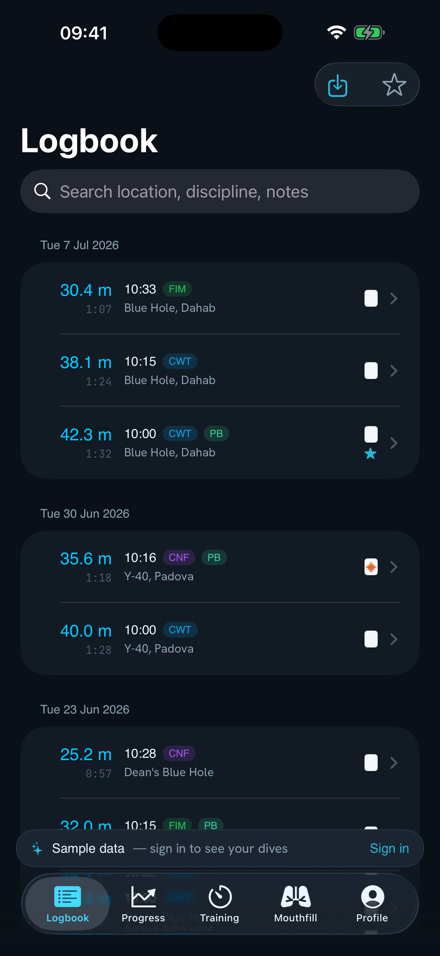
Logbook on iPhone — dives with depth, time and discipline
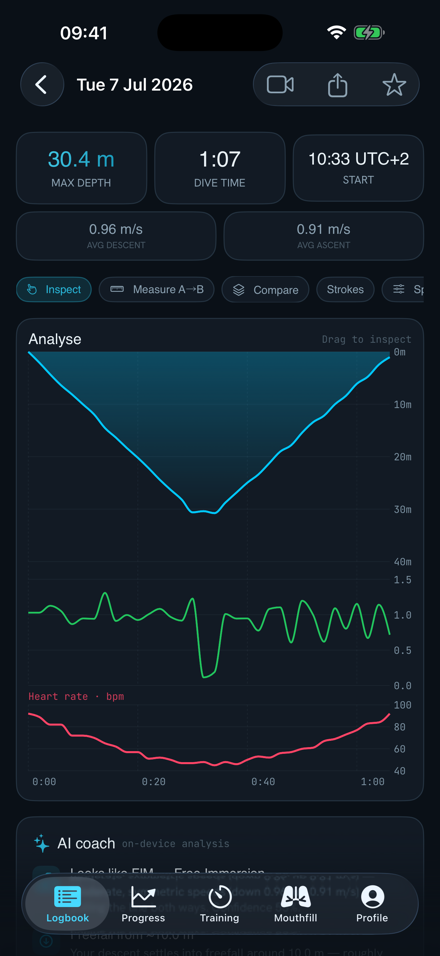
Dive analysis on iPhone — depth profile, speed and heart rate
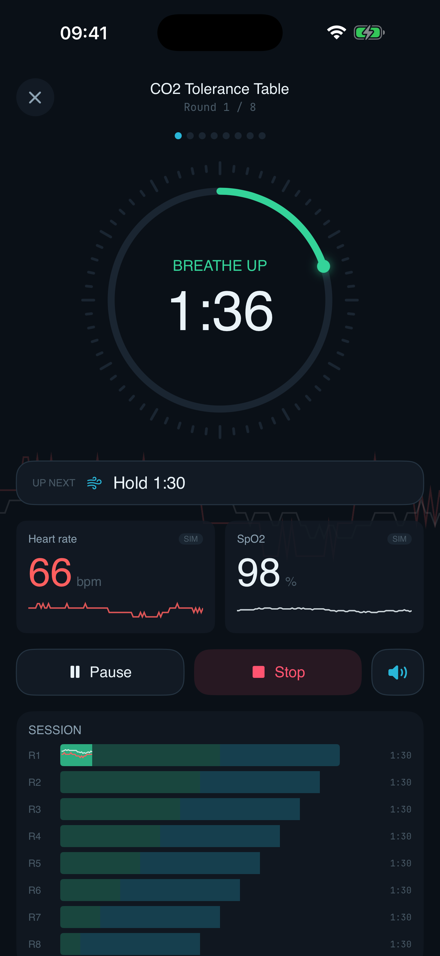
Guided training player on iPhone — breathe up timer with live heart rate

Dives, training tables & progress sync between your phone and the web · video files stay on each device

Bring your whole freediving practice together

Free, in your browser and on your phone — everything in sync. Your dives stay private until you choose to share.

Dive analysis — depth profile, speed and heart rate

Welcome to freediving.studio

Let’s get you set up in a few quick steps — your units, a tour of the features, and how to bring your dives in from your watch.

Your units

You can change these any time in Settings.

Depth
How depths and speeds are shown
Temperature
Water temperature
Theme
Light or dark appearance

Are you a coach?

Turn this on and a Coaching tab appears — add your athletes and review the dives they share with you. You can change this any time in Settings.

I coach other freedivers
Add your athletes and see the dives they share with you
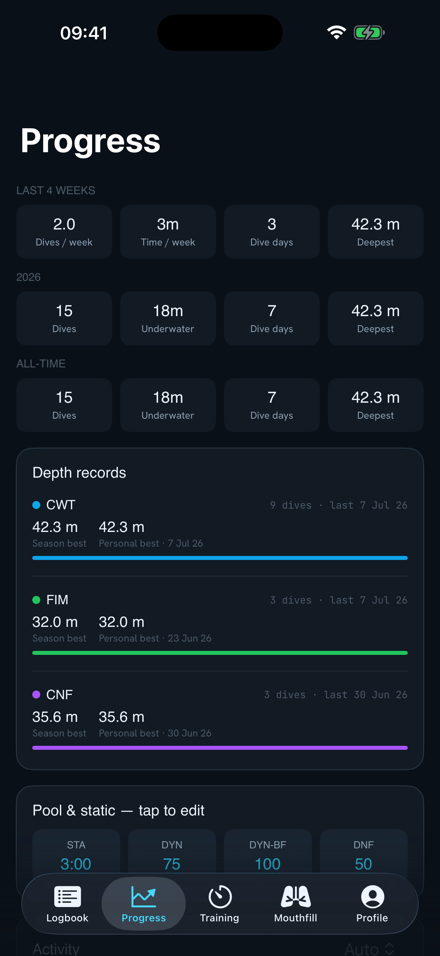
Progress dashboard — personal bests by discipline

What you can do

1Analyse profiles. Depth, speed, temperature and heart rate — with the line shaded by stroke speed.
2Compare & measure. Tick several dives to overlay them, and drag on the graph to read speed between two points.
3Search & star. Find dives in plain English and star your best sessions.
4Plan equalization. Use the Mouthfill Calculator from the top tab.

Bring your dives in

From Garmin or Suunto (a .FIT file), or from Atmos and other dive apps (a .UDDF file). Drag it onto the page, or use “Import Dives”.

ATMOS.UDDF
1Open Garmin Connect, the Suunto app, or the ATMOS app and pick your dive.
2Export the .FIT file (Garmin/Suunto) or the .UDDF file (Atmos and others).
3Back here, hit Import Dives (top right) or just drag the file onto the page. Full step-by-step →
CO₂ Table
Round 1 / 8
Get ready
0:00
bpm
SpO₂ %
Double-tap anywhere during a hold to log a contraction

Select one or more dives to analyse profiles

Drop your .FIT or .UDDF file here